2.7 引导配置
执行
openclaw onboard --install-daemon后的交互式引导配置教程。 无论你使用 macOS、Windows/WSL2 还是 Linux,onboarding 流程基本一致。
一、启动引导程序
在终端执行以下命令启动引导程序:
openclaw onboard --install-daemon
该命令会:
- 启动交互式引导流程
- 同时安装后台守护服务(daemon)
出现下面的提示选 YES
│
◆  I understand this is personal-by-default and shared/multi-user use requires lock-down. Continue?
│  ● Yes / ○ No
└
二、引导流程每一步详解
1) 选择模式:QuickStart 还是 Manual
◆  Setup mode
│  ● QuickStart (Configure details later via openclaw configure.)
│  ○ Manual
└
| 选项 | 说明 | 适用场景 |
|---|---|---|
| QuickStart | 默认本地网关、默认端口、默认工作目录 | 新手首次体验 |
| Manual | 可自定义所有配置项 | 生产环境/进阶用户 |
新手推荐:选择 QuickStart,先快速跑通,后续再用 openclaw configure 调整。
2) 模型与认证(Model / Auth)
│
◆  Model/auth provider
│  ● Anthropic (setup-token + API key)
│  ○ BytePlus
│  ○ Chutes
│  ○ Cloudflare AI Gateway
│  ○ Copilot
│  ○ Custom Provider
│  ○ DeepSeek
│  ○ Google
│  ○ Hugging Face
│  ○ Kilo Gateway
│  ○ Kimi Code
│  ○ LiteLLM
│  ○ MiniMax
│  ○ Mistral AI
│  ○ Moonshot AI (Kimi K2.5)
│  ○ Ollama
│  ○ OpenAI
│  ○ OpenCode
│  ○ OpenRouter
│  ○ Qianfan
│  ○ Qwen
│  ○ Qwen (Alibaba Cloud Model Studio)
│  ○ SGLang
│  ○ Synthetic
│  ○ Together AI
│  ○ Venice AI
│  ○ Vercel AI Gateway
│  ○ vLLM
│  ● Volcano Engine
│  ○ xAI (Grok)
│  ○ Xiaomi
│  ○ Z.AI
│  ○ Skip for now
└
步骤 2.1 - 选择供应商
选择你已有 API Key 的模型供应商,常见选项:
- OpenAI - GPT-4o, GPT-4 Turbo 等
- Anthropic - Claude 3.5 Sonnet, Claude 3 Opus 等
- Google / Gemini - Gemini Pro, Gemini Ultra 等
- Ollama - 本地模型
- Custom - 其他兼容 OpenAI API 的供应商
如果暂时还不确定用哪个,可以先选Skip for now,后续在配置文件中配置
这里我以方舟大模型的Coding Plan的接入方法举例,选择Volcano Engine (API key)
方舟大模型Coding Plan接入OpenClaw的官方文档
步骤 2.2 - 输入 API Key
◆  Enter Volcano Engine API key
│  _
└
粘贴你的 API Key(输入时不显示,这是正常的安全行为)。
提示:确保 API Key 有效且有足够余额。
步骤 2.3 - 选择默认模型
◇  Model configured ─────────────────────────────────────╮
│                                                        │
│  Default model set to volcengine-plan/ark-code-latest  │
│                                                        │
├────────────────────────────────────────────────────────╯
│
◆  Default model
│  ○ Keep current (volcengine-plan/ark-code-latest)
│  ○ Enter model manually
│  ○ volcengine/deepseek-v3-2-251201
│  ○ volcengine/doubao-seed-1-8-251228
│  ○ volcengine/doubao-seed-code-preview-251028
│  ○ volcengine/glm-4-7-251222
│  ○ volcengine/kimi-k2-5-260127
│  ● volcengine-plan/ark-code-latest (Ark Coding Plan · ctx 250k)
│  ○ volcengine-plan/doubao-seed-code
│  ○ volcengine-plan/doubao-seed-code-preview-251028
│  ○ volcengine-plan/glm-4.7
│  ○ volcengine-plan/kimi-k2-thinking
│  ○ volcengine-plan/kimi-k2.5
└
选择一个作为默认使用的模型。建议选择该供应商的旗舰模型(如 GPT-4o、Claude 3.5 Sonnet)。
后续调整:
openclaw configure
3) Select channel 消息渠道
◆  Select channel (QuickStart)
│  ○ Telegram (Bot API)
│  ○ WhatsApp (QR link)
│  ○ Discord (Bot API)
│  ○ IRC (Server + Nick)
│  ○ Google Chat (Chat API)
│  ○ Slack (Socket Mode)
│  ○ Signal (signal-cli)
│  ○ iMessage (imsg)
│  ○ LINE (Messaging API)
│  ○ Feishu/Lark (飞书)
│  ○ Nostr (NIP-04 DMs)
│  ○ Microsoft Teams (Bot Framework)
│  ○ Mattermost (plugin)
│  ○ Nextcloud Talk (self-hosted)
│  ○ Matrix (plugin)
│  ○ BlueBubbles (macOS app)
│  ○ Zalo (Bot API)
│  ○ Zalo (Personal Account)
│  ○ Synology Chat (Webhook)
│  ○ Tlon (Urbit)
│  ○ Twitch (Chat)
│  ● Skip for now (You can add channels later via `openclaw channels add`)
└
国内推荐飞书。这里暂时跳过,后续单独接入飞书。
4) Web search 网络搜索
◇  Web search ─────────────────────────────────────────────────────────────────╮
│                                                                              │
│  Web search lets your agent look things up online.                           │
│  Choose a provider. Some providers need an API key, and some work key-free.  │
│  Docs: https://docs.openclaw.ai/tools/web                                    │
│                                                                              │
├──────────────────────────────────────────────────────────────────────────────╯
│
◆  Search provider
│  ○ Brave Search
│  ● DuckDuckGo Search (experimental) (Free web search fallback with no API key required · key-free)
│  ○ Exa Search
│  ○ Firecrawl Search
│  ○ Gemini (Google Search)
│  ○ Grok (xAI)
│  ○ Kimi (Moonshot)
│  ○ Perplexity Search
│  ○ Tavily Search
│  ○ Skip for now
└
如果有喜欢的网络搜索服务可以选择并配置API-KEY,这里默认选择DuckDuckGo Search,因为他免费且不需要输入API KEY
5) Skills 技能配置
◇  Skills status ─────────────╮
│                             │
│  Eligible: 4                │
│  Missing requirements: 39   │
│  Unsupported on this OS: 7  │
│  Blocked by allowlist: 0    │
│                             │
├─────────────────────────────╯
│
◆  Configure skills now? (recommended)
│  ● Yes / ○ No
└
如果选YES,会提供以下skills选择,通过空格键选择对应的技能。如果现在不想配置,可以先选择Skip for now,后面单独配置技能
◆  Install missing skill dependencies
│  ◼ Skip for now (Continue without installing dependencies)
│  ◻ 🔐 1password
│  ◻ 📰 blogwatcher
│  ◻ 🫐 blucli
│  ◻ 📸 camsnap
│  ◻ 🧩 clawhub
│  ◻ 🛌 eightctl
│  ◻ ✨ gemini
│  ◻ 🧲 gifgrep
│  ◻ 🐙 github
│  ◻ 🎮 gog
│  ◻ 📍 goplaces
│  ◻ 📧 himalaya
│  ◻ 📦 mcporter
│  ◻ 📄 nano-pdf
│  ◻ 💎 obsidian
│  ◻ 🎤 openai-whisper
│  ◻ 💡 openhue
│  ◻ 🧿 oracle
│  ◻ 🛵 ordercli
│  ◻ 🔊 sag
│  ◻ 🌊 songsee
│  ◻ 🔊 sonoscli
│  ◻ 🧾 summarize
│  ...
└
6) 环境变量配置
这里推荐暂时选全部选 NO
◇  Set GOOGLE_PLACES_API_KEY for goplaces?
│  No
│
◇  Set NOTION_API_KEY for notion?
│  No
│
◇  Set OPENAI_API_KEY for openai-whisper-api?
│  No
│
◇  Set ELEVENLABS_API_KEY for sag?
│  No
7) 是否启用hooks功能
◇  Hooks ──────────────────────────────────────────────────────────────────╮
│                                                                          │
│  Hooks let you automate actions when agent commands are issued.          │
│  Example: Save session context to memory when you issue /new or /reset.  │
│                                                                          │
│  Learn more: https://docs.openclaw.ai/automation/hooks                   │
│                                                                          │
├──────────────────────────────────────────────────────────────────────────╯
│
◆  Enable hooks?
│  ◻ Skip for now
│  ◻ 🚀 boot-md
│  ◻ 📎 bootstrap-extra-files
│  ◻ 📝 command-logger
│  ◻ 💾 session-memory
└
先选Skip for now
8) 选择和BOT对话的方式
│
◇  Control UI ─────────────────────────────────────────────────────────────────────╮
│                                                                                  │
│  Web UI: http://127.0.0.1:18789/                                                 │
│  Web UI (with token):                                                            │
│  http://127.0.0.1:18789/#token=8a5480b0e009b5246dc63048347ec6bb6a667f57652a213c  │
│  Gateway WS: ws://127.0.0.1:18789                                                │
│  Gateway: reachable                                                              │
│  Docs: https://docs.openclaw.ai/web/control-ui                                   │
│                                                                                  │
├──────────────────────────────────────────────────────────────────────────────────╯
│
◇  Start TUI (best option!) ─────────────────────────────────╮
│                                                            │
│  This is the defining action that makes your agent you.    │
│  Please take your time.                                    │
│  The more you tell it, the better the experience will be.  │
│  We will send: "Wake up, my friend!"                       │
│                                                            │
├────────────────────────────────────────────────────────────╯
│
◇  Token ────────────────────────────────────────────────────────────────────────────────────╮
│                                                                                            │
│  Gateway token: shared auth for the Gateway + Control UI.                                  │
│  Stored in: ~/.openclaw/openclaw.json (gateway.auth.token) or OPENCLAW_GATEWAY_TOKEN.      │
│  View token: openclaw config get gateway.auth.token                                        │
│  Generate token: openclaw doctor --generate-gateway-token                                  │
│  Web UI keeps dashboard URL tokens in memory for the current tab and strips them from the  │
│  URL after load.                                                                           │
│  Open the dashboard anytime: openclaw dashboard --no-open                                  │
│  If prompted: paste the token into Control UI settings (or use the tokenized dashboard     │
│  URL).                                                                                     │
│                                                                                            │
├────────────────────────────────────────────────────────────────────────────────────────────╯
│
◆  How do you want to hatch your bot?
│  ● Hatch in TUI (recommended)
│  ○ Open the Web UI
│  ○ Do this later
└
这里TUI和Web UI的区别
- TUI: 直接在当前终端里启动和Bot对话
- Web UI: 会打开浏览器进入控制面板,在浏览器里和Bot对话
这里我们是在本机安装,选择Web UI。选择后会自动启动浏览器并打开http://127.0.0.1:18789/chat?session=main
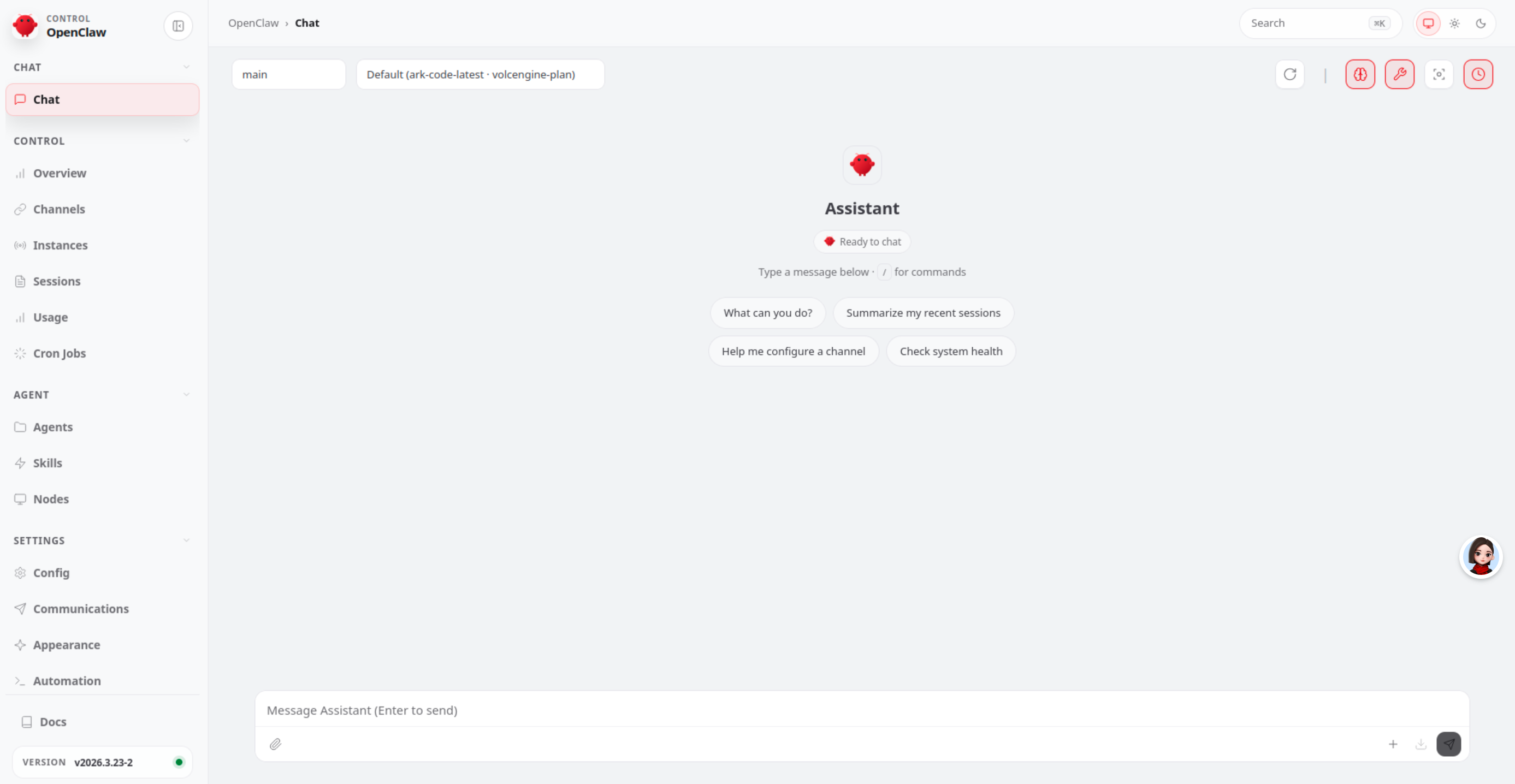
在这里我们可以直接和BOT对话进行测试
三、安装后验证
引导程序完成后,验证服务是否正常运行:
# 查看版本
openclaw --version

# 诊断检查
openclaw doctor

# 网关状态
openclaw gateway status

# 打开控制台
openclaw dashboard
预期输出:
gateway status显示服务运行中openclaw dashboard打开浏览器控制台(通常是http://127.0.0.1:18789/)
四、常用配置命令
# 重新配置(修改已有设置)
openclaw configure

# 重新运行引导
openclaw onboard

# 查看网关状态
openclaw gateway status

# 重启网关
openclaw gateway restart

# 停止网关
openclaw gateway stop

# 启动网关
openclaw gateway start
五、常见问题
1) 引导配到一半想重来
openclaw configure
或重新执行:
openclaw onboard
2) 想修改 API Key
openclaw configure
# 或
openclaw auth update
3) 想修改端口或绑定地址
openclaw configure
# 选择 Gateway 配置
4) 守护服务没有自动启动
# 检查 daemon 状态
openclaw daemon status

# 手动启动
openclaw daemon start

# 启用开机自启
openclaw daemon enable